In this article14 sections
IT system security is the ability of an organisation to use its computers, networks, applications, accounts and data reliably even when mistakes, outages or attacks occur. It is much more than an antivirus subscription or a firewall: protection also requires ownership, access controls, maintenance, monitoring and a tested recovery plan.
Many companies buy individual security tools without being able to answer basic questions. Who still has administrator access? When was the last backup restoration tested? Who responds to an alert outside office hours? The next meaningful improvement is often not another product, but clearer processes around existing systems.
What does IT system security mean?
IT security, or cybersecurity for business information systems, comprises organisational and technical practices that protect devices, networks, software, identities and data. The goal is not to promise that incidents will never happen. It is to reduce their likelihood and impact, detect problems quickly and restore operations to an acceptable state.
Three principles help explain the purpose. Confidentiality means information is available only to authorised people. Integrity means information stays accurate and is not changed without permission. Availability means systems and data can be used when needed. Businesses need all three. A company can suffer serious disruption from a failed application even if no confidential file has been stolen.
Security is a continuing responsibility. New staff, remote work, cloud services, software updates, suppliers and emerging attack techniques constantly change the organisation's exposure.
The six functions of NIST Cybersecurity Framework 2.0
The NIST Cybersecurity Framework 2.0 describes six connected areas for managing cyber risk:
- Govern: establish ownership, policies, expectations and decision-making for security risk.
- Identify: understand assets, services, data and business dependencies.
- Protect: apply safeguards such as access controls, patching and device protection.
- Detect: discover suspicious events through logs and monitoring.
- Respond: contain, analyse and coordinate action during an incident.
- Recover: restore systems and business operations and improve from lessons learned.
The framework is useful to smaller organisations as well as enterprises. It does not mean that each function must be equally sophisticated from day one. Rather, leadership should know where the most consequential gaps are. Sophisticated detection offers little value if nobody owns the response. Similarly, a backup application cannot guarantee recovery if the restoration procedure has never been tested.
Start with an inventory of assets and dependencies
You cannot consistently secure assets you do not know you have. A useful starting point is an inventory of workstations, servers, network devices, domains, cloud services, user identities, business applications and critical datasets. Record who owns each asset, why it exists, where it operates, how it is maintained and which business processes depend on it.
The UK National Cyber Security Centre (NCSC) advises organisations to understand both technology and the information it processes. Hidden dependencies matter: a legacy service maintained by one employee, a forgotten administrator account, unsupported equipment or a backup stored on the same machine as the original data.
An inventory is not a one-time spreadsheet. Update it when staff arrive or leave, devices are purchased, vendors change or services migrate to the cloud. A short, reliable register kept current is more useful than an elaborate system nobody maintains.
Protecting identities with access controls and MFA
Significant business exposure arises when someone gains access to an account they should not control. Each employee should have an individual identity and the least privilege necessary for their role. Shared administrator accounts and permanent elevated rights make investigating events harder.
Multifactor authentication (MFA) adds another factor, so knowledge of a password alone is not sufficient. Where feasible, phishing-resistant authentication methods deserve priority over reliance on SMS codes. CISA's cybersecurity guidance highlights identity protection as a high-impact foundational measure.
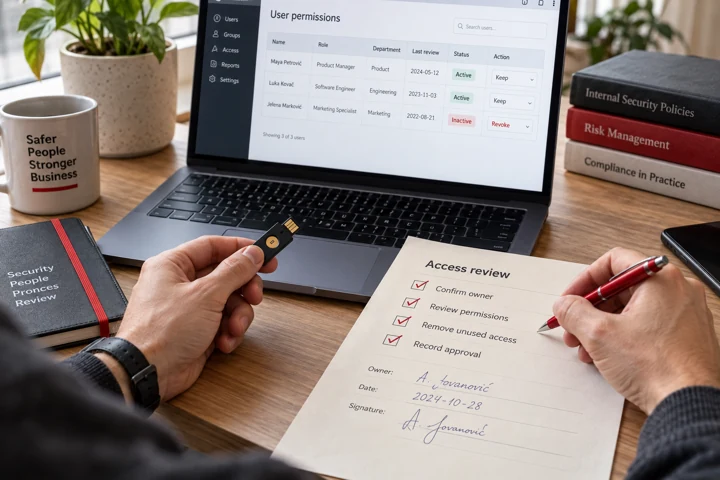
Privileged, finance and remote-access accounts require particular attention. When an employee leaves, access should be removed across the relevant on-premises, cloud and SaaS systems. Periodic access reviews should answer three questions: who can access the data, who approved that access and when was the approval last checked?
Endpoint protection, antivirus, EDR and patching
Every business laptop, desktop and server is part of the security picture. Devices need supported operating systems, appropriate protection, regular updates and software installation rules. An unmanaged laptop or a device with disabled protection can create a meaningful gap even when the organisation has purchased enough licences.
Antivirus helps detect or block known and suspicious malicious activity. EDR (Endpoint Detection and Response) can add endpoint telemetry and capabilities to investigate and respond to incidents. Neither replaces software patching, control of administrative privileges or a person responsible for incoming alerts.
Our related guide, Antivirus Software: A Practical Protection Guide, explains how to compare protection technologies. For a business, the ability to centrally see coverage and act on warnings is at least as important as the feature list of an individual device.
Network security and segmentation
A firewall helps control certain network connections, but it should not be considered the only security boundary. If one device is compromised, an attacker may attempt to reach other services when networks have no appropriate restrictions between them.
Network segmentation separates groups of devices and services according to business need. For example, guest Wi-Fi, employee workstations, administrative systems and important servers do not necessarily need unrestricted access to one another. Design restrictions around actual workflows, not only around the building's physical layout.
Remote access also requires governance: MFA, authentication logs, maintained VPN or alternative access platforms and explicit approval of users. Unnecessary internet-facing management panels, test servers and default passwords can create routes into much more important systems.
Data security: classification, encryption and backup
Not every file has the same level of sensitivity. Public presentations, internal policies, personal information, finance records and engineering documents can require different access and retention rules. Simple classification makes sharing, ownership and retention easier to manage.
Encryption in transit and on devices can reduce the impact of interception or device loss. Yet encryption alone does not stop an attacker using a compromised, already-authorised account to read information that the application has decrypted.
Backups must be distinct from ordinary synchronisation and should support a useful history of recoverable states. Establish how much recent data may be lost during disruption (RPO), how much downtime is acceptable (RTO) and who coordinates restoration. A successful backup status notification is not a substitute for a real recovery exercise.
Cloud platforms involve shared responsibilities between the provider and customer. Our article Cloud Storage: Why Businesses Move to the Cloud discusses storage, sync and backup as different capabilities.
Phishing, email threats and employee awareness
Attackers target human decisions because persuading someone to approve a fraudulent payment, open a malicious attachment or enter credentials into a fake portal may be easier than exploiting a well-maintained server.
Training should not be a single annual slideshow. People need a clear and non-punitive way to report suspicious messages. Finance and administration teams may need additional checks when payment details change or someone requests an urgent transfer.
Technical safeguards such as email filtering, account protection, MFA and appropriate attachment controls complement awareness training. The strongest procedures are often straightforward: verify important requests through an independent channel and involve the right person before an irreversible or financially significant action.
Logs and monitoring: how can an organisation detect incidents?
If suspicious account activity or a data change is reported, investigation is difficult without records of what happened. Relevant logs can come from identity systems, critical servers, network equipment, endpoint tools and important applications.
NCSC's logging and monitoring guidance emphasises that records should be available for analysis and aligned with incident response. Collecting everything without a purpose is not a strategy. Start with questions the organisation will need answered: who logged in, what changed, when a device stopped reporting protection and whether unusual access took place.
Protect the integrity of records, keep them for a proportionate period according to operational and legal requirements, and assign ownership of alerts. A central dashboard adds value only if events are reviewed, prioritised and escalated appropriately.
Incident response: what happens after a security event?
Response planning begins before the attack. An organisation should know whom to contact, which communications will remain available, which business services are most important and who can authorise temporary isolation of affected devices. During a suspected compromise, preserve relevant evidence and involve qualified responders rather than randomly deleting files.
NIST Special Publication 800-61 Revision 3, finalised in 2025, integrates incident response into broader cybersecurity risk management. Existing inventories, access controls and backup arrangements directly influence how quickly an organisation can respond and recover.
The precise response depends on the incident, but typically involves validating the event, assessing its scope, limiting further damage, removing the cause, restoring operations and recording lessons learned. When personal or other sensitive information may be involved, appropriate legal and data-protection stakeholders should be included.
Third-party and supply-chain security
A company's IT environment extends beyond its physical office. Hosting companies, SaaS platforms, accountants, software vendors, creative agencies and managed IT providers may hold sensitive data or possess access to important systems.
Before signing a contract, clarify who is responsible for which controls, what access the provider needs, how incidents are reported, how backups are handled and how data can be exported when the relationship ends. Ask for answers relevant to the organisation's actual risks rather than assuming that a familiar provider name eliminates exposure.
Forgotten accounts and integrations belonging to former suppliers can be especially difficult to notice. Keep an owner and a review date for each external connection, and remove access that is no longer justified.
A practical 90-day IT security improvement plan
Days 1–30 — establish visibility. Inventory devices, applications, data, accounts and service providers. Locate unsupported systems, missing updates and the most important business dependencies. Assign owners to meaningful risks.
Days 31–60 — strengthen essential controls. Enable MFA for critical accounts, review privileged roles, improve patch management and establish centrally visible endpoint protection. Confirm that backups are protected and that data can actually be restored.
Days 61–90 — improve response and measurement. Review useful logs, alert ownership, network boundaries, supplier access and the incident plan. Exercise a realistic scenario such as a compromised account, ransomware attempt or critical server outage.
These periods are illustrative milestones, not a guarantee of security within ninety days. Priorities and pace should reflect the organisation's dependencies, constraints and risk profile.
How should a business measure IT security?
The number of purchased licences or the absence of reported attacks are not sufficient indicators. Better measures include the percentage of endpoints with healthy protection, the number of unsupported systems, MFA coverage, time to resolve significant vulnerabilities and the results of restoration tests.
Track privileged-account reviews, time from detection to action and high-priority risks without owners. Reports should support decisions rather than produce decorative charts: what is most exposed, what business impact is possible, who is accountable and when will the issue be addressed?
Good security management does not promise “100% protection”. It gives stakeholders an accurate view of implemented safeguards, completed tests and the risks that remain.
Conclusion: IT system security is a business responsibility
Strong security depends on knowing your devices and data, restricting access, keeping software up to date, monitoring meaningful events and testing recovery. Antivirus, firewalls, MFA, backups and EDR are important components, but people and procedures make them sustainable.
To review endpoint protection, infrastructure resilience and operational support, explore CoreTech IT and security services or schedule a conversation. Start with a risk inventory and one measurable improvement plan rather than buying the next product without defining the problem.
Related service: CoreTech IT infrastructure.
Frequently asked questions
What does IT system security include?
It includes protection of devices, networks, applications, identities and data, alongside risk management, monitoring, incident response and recovery. The aim is to reduce both likelihood and impact of disruption or attack.
Do antivirus and a firewall guarantee IT security?
No. They are useful layers but do not replace MFA, patching, limited privileges, tested backups, supplier controls and an incident response plan.
What should a small business secure first?
Start by inventorying critical systems, devices, data and accounts. Then prioritise MFA for important access, timely updates, endpoint visibility, recoverable backups and clear ownership of alerts.
What belongs in an IT incident response plan?
It defines reporting, isolation authority, investigation responsibilities, communications, recovery and escalation to legal or other relevant teams. The plan should be exercised periodically.
Does moving to the cloud remove a company's data-security responsibilities?
No. Providers manage parts of the underlying infrastructure, while customers remain responsible for their identities, permissions, data, configurations and recovery policies according to the service model.
How do you measure IT system security?
Useful indicators include protected and updated endpoint coverage, MFA adoption, unresolved critical vulnerabilities, response time to alerts and the results of recovery tests.