In this article13 sections
Reliable IT support means more than someone answering the phone when a computer stops working. Businesses depend on networks, applications and data being available, on problems being noticed early enough and on employees knowing where to request help. Ongoing IT maintenance brings together technical checks, security controls, user assistance and capacity planning. When these parts work together, everyday operations depend less on luck and improvised repairs.
Editorial note (October 2026): This is a restored and expanded edition of Positive's “Važnost pouzdane IT podrške” (“The Importance of Reliable IT Support”), first published on 26 March 2025. The original article, credited to Positive in the IT Infrastructure category, covered five main areas: continuous operations, data security, efficient support, network optimisation and long-term maintenance planning. Its examples of monitoring, updates, firewalls, help desks, automation, cloud capacity and training are preserved. Additional details about SLAs, backup testing and risk-based priorities are editorial guidance, not case results attributed to specific customers. Round-the-clock support and particular response times apply only when explicitly agreed in the service contract.
IT maintenance: why dependable network support matters
Business IT is a collection of connected devices and services: internet access, office networking, servers, workstations, applications, employee identities and cloud-stored information. A problem in one place can affect many teams. Unreliable wireless coverage may interrupt a meeting, failing network equipment may block an application and an unsuitable update may disrupt a critical service.
Dependable maintenance therefore combines preventive checks, a clear way of reporting problems and a recovery plan when interruptions occur. Its goal is not to promise that failures will never happen. It is to understand risks, recognise incidents and help an organisation respond in a predictable way.
The original Positive article presented network support as an important contribution to productivity and security. This applies to small offices and multi-site organisations, although the scope of necessary controls will differ.
1. Continuous operations and fewer disruptions
The first historical theme is the continuity of business systems. A short outage may not sound serious until it blocks invoicing, customer communication or access to shared files. The consequences depend on the work affected, the number of users and how long normal operations take to resume.
The original article highlighted network performance monitoring, proactive issue detection and timely software and hardware updates. These activities may reveal full disks, unstable connections, overloaded devices and recurring errors before a larger incident. Monitoring only provides value, however, when someone receives an alert and has a clear response procedure.
Maintenance should also be scheduled to minimise disruption to employees. Critical systems may need separate change windows, tested rollback procedures and checks after work is completed. Preparation reduces the risk of a well-intentioned fix creating another outage.
2. Data protection and cyberattack prevention
The second original topic concerns the protection of business information. Network infrastructure needs appropriate access separation, secure connectivity and oversight of suspicious traffic. Owning a firewall or antivirus product is not sufficient on its own. Configuration, updates and supervision determine how useful those tools are.
Historical examples included firewalls, antivirus products, security protocol updates and monitoring of network traffic. In modern environments, these should be coordinated with multifactor authentication, least-privilege access and a clear inventory of devices allowed to reach sensitive information. Controls must be proportionate to actual risks.
Security also depends on employee awareness. A suspicious message, a lost device or an unexpected sign-in should be reported quickly. A clear reporting procedure is often more useful than lengthy rules that staff do not know how to follow.
3. Efficient support and faster problem resolution
The third historical theme is assistance to users. When an employee encounters a technical problem, they need to know how to report it, what response to expect and when they will receive another update. Without a common reporting channel, requests disappear into private messages, informal conversations or disorganised email chains.
The original article recommended a help desk, automation for common requests and the availability of expert assistance, citing 24/7 as one possible model. There is an essential distinction between desirable availability and contracted service: not every support package covers nights, weekends and holidays.
A good help desk records the issue, category, priority, accountable technician and resolution history. Internet access failing for an entire office may justify a higher priority than a problem with one peripheral device. Shared rules make the allocation of limited expertise more consistent and transparent.
4. Network resource optimisation
The fourth historical subject is matching infrastructure to the organisation's needs. A network may technically function yet deliver poor performance at important times because of insufficient capacity, unsuitable wireless coverage or traffic configuration. Periodic performance analysis can therefore have real operational value.
The original text mentioned traffic analysis, adjusting capacity and using cloud resources for flexibility. In practice, separate the number of users, latency-sensitive applications, internet connection usage and remote-access requirements. Not every slow application means that a new server is necessary.
Performance changes must also be assessed for security consequences. Improving speed should not mean disabling important access controls or reducing protection. The aim is to balance performance, reliability and security, with documented changes and measurable outcomes.
5. A long-term IT maintenance strategy
The fifth original area emphasised that maintenance should not be purely reactive. Replacing equipment only after a serious failure may force expensive and rushed decisions. A longer-term plan helps teams treat equipment, licences and expert support as predictable parts of the business budget.
The original Positive article included maintenance investment planning, ongoing security education and network tests or incident simulations. Such activities work best when aligned with practical questions: when does vendor support expire, which applications are critical, where is there a single point of failure and who can respond if the main administrator is unavailable?
Planning need not be overly complicated. A straightforward record of assets, renewal dates, system owners and periodic checks can support better decisions than a chain of unrelated emergency repairs.
Proactive monitoring: what should be measured?
Monitoring should not produce an endless wall of dashboards. Useful signals include availability of critical applications, memory and CPU utilisation where relevant, remaining disk capacity, backup status, significant network-device alerts and the success of essential business services.
Alert thresholds depend on context. A brief spike in network usage is not necessarily an incident, but repeated connection loss during working hours may need investigation. Teams should distinguish informational notices from events requiring urgent action.
Every significant alert should have an owner and a defined next step. If monitoring reports a failure outside contracted support hours, the organisation should already know how that situation will be handled. Observing a problem and having people available to fix it are separate commitments.
Help desks, priorities and service-level agreements
A service-level agreement (SLA) makes expectations explicit. It may define support hours, reporting channels, initial response time, escalation and other obligations. Initial response time should not automatically be interpreted as a guaranteed time for fully resolving an issue.
Priorities can be based on impact and urgency. An outage affecting everyone differs from a question about a single application setting. Yet something apparently small may still be urgent for an employee facing a statutory or contractual deadline.
Businesses and support providers should agree on definitions for critical incidents before they occur. Otherwise, what the customer considers an emergency may differ from what the support team is actually contracted and equipped to deliver.
Backups and recovery when an incident occurs
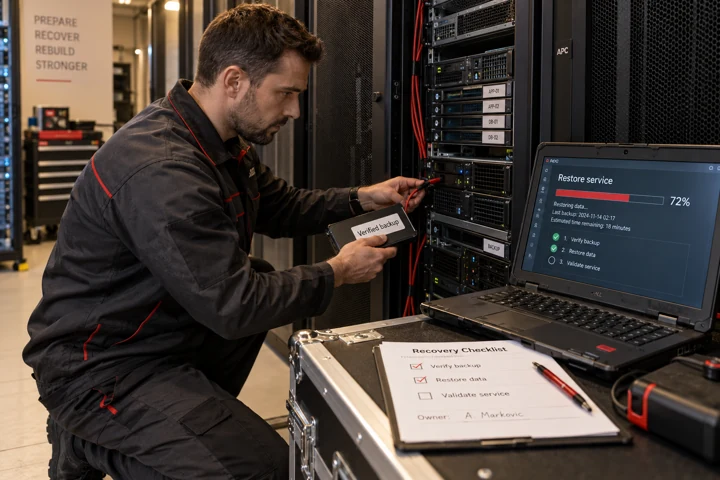
Network support helps business continuity, but it cannot prevent every mistake or attack. Important data should have appropriately separated backups that are not exposed to all the same risks as the primary systems. Otherwise a failure or compromised account could affect original data and copies at the same time.
Organisations should define an acceptable amount of data loss and a target period for restoring services. These are commonly called recovery point objectives (RPOs) and recovery time objectives (RTOs). Values should reflect business consequences rather than being copied from a generic template.
A tested restore is the strongest practical evidence of readiness. Successfully creating a backup is not proof that recovery will work. Tests, responsibilities and observed problems should be documented and revisited.
Updates and managing changes safely
Updates for operating systems, network devices and applications can fix vulnerabilities and stability issues. Yet introducing an untested change to a critical system during an important business process can itself trigger downtime. Maintenance has to balance timely fixes with compatibility and scheduling.
For significant changes, define the responsible person, expected impact, timing, rollback procedure and post-change verification. Where vulnerabilities are being actively exploited, waiting may be riskier than an accelerated change. Decisions must be informed by the actual environment.
Documentation helps when another technician or external partner investigates a problem. Information about versions, configurations and the last successful change can shorten an investigation, without guaranteeing a particular repair time.
How to recognise a dependable IT support partner
When choosing a service provider, it is more useful to understand how they will work with your systems than to compare prices alone. Ask how incidents are reported, how priorities are assigned, who owns monitoring, what documentation is maintained and what is included in a recurring service.
Review how administrator access and customer information are protected, how interventions are logged and what happens when the relationship ends. A company should know who owns its accounts, equipment and configurations and how to obtain documentation or transition to another partner.
A practical assessment or small pilot may help establish a realistic improvement plan. A reliable provider explains service boundaries clearly and does not promise that outages or attacks will become impossible.
Measuring IT support quality
A high number of closed tickets does not prove that support is effective. Examine recurring incidents, downtime of critical services, contracted response performance, time to actual resolution and the experience of employees seeking help.
Metrics require context. More reported incidents may mean more underlying problems, but they may also reflect the introduction of proper tracking. Likewise, shorter ticket closure times are not an improvement if the same fault keeps returning.
Good maintenance quality is demonstrated through more predictable operations, better managed changes and fewer unpleasant surprises. Regular reviews connect technical support with outcomes that actually matter to the business.
Conclusion: IT support as part of business continuity
Positive's original March 2025 article identified five important concerns: continuous operations, information security, fast problem resolution, network optimisation and strategic planning. They remain a sound framework for organisations seeking more reliable infrastructure.
Progress comes from turning those themes into repeatable procedures: monitoring with clear accountability, contracted support expectations, maintained systems, tested backups and planned changes. Reliable IT support does not mean the complete absence of failure. It means reducing risk, recognising problems and keeping the organisation able to recover and work predictably.
Frequently asked questions
What does reliable IT support include?
It includes network and device maintenance, monitoring, help desk, security safeguards, change planning and recovery procedures.
How does IT maintenance reduce downtime?
Through performance monitoring, early detection, planned updates and clearly defined response procedures.
Is IT support always available 24/7?
No. Round-the-clock coverage, escalation and response commitments must be expressly included in the contract or SLA.
Why do backups matter alongside network maintenance?
Maintenance cannot prevent every failure or attack, so backups must be protected and periodically tested through actual restores.
How should help desk tickets be prioritised?
Usually by business impact and urgency, using agreed criteria and clear communication.
How can a business choose an IT support partner?
Look for clear scope, contracted service levels, protection of administrator accounts, documentation and evidence of ongoing checks.